

Google OAuth
Vulnotes supports Google OAuth for organizations that use Google Workspace. Users can log in with their Google account instead of a separate password.
Setup
- Go to the Google Cloud Console and create an OAuth 2.0 client. Copy its Client ID and Client Secret.
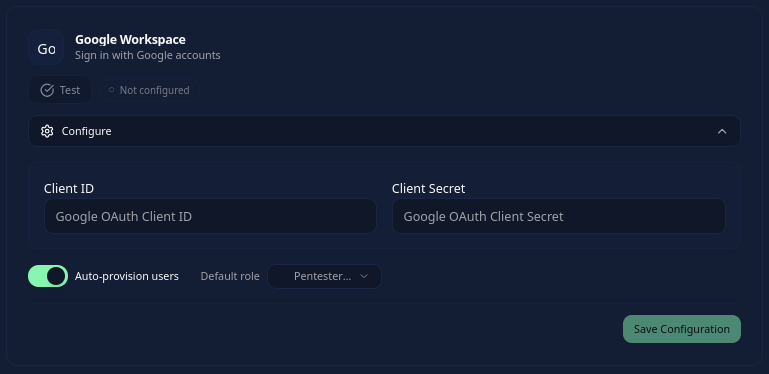
- In Vulnotes, go to Administration > Settings > Security, enable Enable SSO, and open Configure on the Google Workspace card.
- Enter the Client ID and Client Secret, choose Auto-provision users and a Default role, then save.
- In Google Cloud Console, add the authorized redirect URI
https://your-instance/api/auth/sso/callback/PROVIDER_ID, using your public backend URL and the saved provider's ID. - Use Test in Vulnotes, then enable the provider after the test succeeds. Verify a Google sign-in before inviting other users.
Your instance administrator can confirm the provider ID and public backend URL. The redirect URI must match the callback used by your instance exactly.
How login works
When Google OAuth is enabled, users see a Sign in with Google button on the login page. Clicking it opens the Google account selection screen. After selecting their account and granting access, they are redirected back to Vulnotes.
If Auto-provision users is enabled, a first login creates an account with the configured default role, subject to the license's user limit. If it is disabled, the account must already be linked to that provider. An existing local account is not automatically linked just because its email matches the Google account.
Availability and access
Google login requires internet access and is hidden in offline editions. SSO is also hidden on the single-user Air-Gap Workstation.
Vulnotes does not provide an email-domain allowlist in this configuration. Control who may use the OAuth application in Google Workspace and choose auto-provisioning accordingly.