

MCP Server
Vulnotes exposes its operational API as Model Context Protocol (MCP) tools. The server is available at /mcp on the same instance and uses a Vulnotes API key. Tools are filtered by the key's effective permissions and every API request is authorized again by the backend.
Create and connect a key
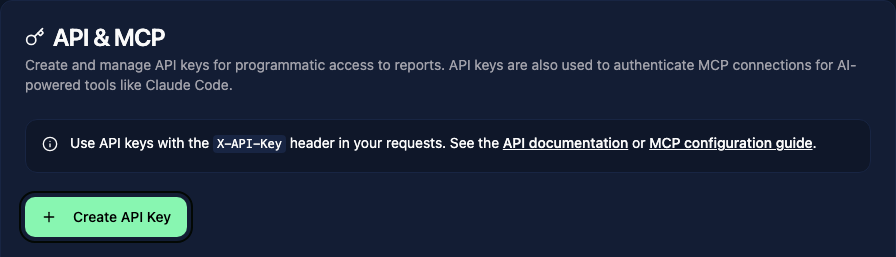
- Open Settings > API & MCP as an administrator.
- Create a key, give it a descriptive name, and select only the permissions needed by the integration.
- Copy the key when it is shown. It cannot be retrieved later.
- Connect your MCP client. For Claude Code:
claude mcp add --transport http vulnotes https://your-instance.vulnotes.app/mcp \
  --header "Authorization: Bearer vuln_sk_your_api_key_here"
API requests outside MCP use the same key in X-API-Key:
curl --fail-with-body \
  -H 'X-API-Key: vuln_sk_your_api_key_here' \
  https://your-instance.vulnotes.app/api/api-keys/me
Reconnect after changing a key's permissions. The advertised tool list is read when the MCP session starts, while the API enforces the current permissions on every call.
Permission model
| Permission | Operational access |
|---|---|
ro:reports | Read reports, dashboard data, findings, snapshots, review comments, report notes, report images, and report attachments |
rw:reports | Create/update/delete reports and findings, import/sync reports, retest findings, edit review comments, and manage report files. It also grants ro:reports. |
ro:templates | Read/search/preview report templates, revisions, and template images |
rw:templates | Create, import, clone, translate, update, clear, and delete report templates; manage template images. It also grants ro:templates. |
ro:vulnerability_templates | Read vulnerability templates and their report-template associations |
rw:vulnerability_templates | Manage vulnerability templates and their associations. It also grants the read scope. |
ro:vulnerabilities / rw:vulnerabilities | Read or manage the vulnerability library; the write scope also enables vulnerability AI drafting/translation |
ro:clients / rw:clients | Read or manage companies and contacts |
ro:planning / rw:planning | Read or manage planning events, event attachments, and the key owner's availability |
manage:planning | Delete planning events and administer otherwise permitted planning records. It also grants rw:planning. |
The key also inherits its owner's teams, excluded resources, report visibility, and active-account state. A key cannot grant itself permissions its owner does not hold.
Available tools
Reports and content
| Tool | Permission | Purpose |
|---|---|---|
list_reports, get_report | ro:reports | Discover and read accessible reports |
get_report_dashboard_stats, get_report_recent_activities | ro:reports | Read team-scoped dashboard statistics and activity |
create_report, update_report, delete_report | rw:reports | Manage report lifecycle and metadata |
update_report_content | rw:reports | Atomically update a section's content and/or isComplete flag |
list_content_sections, get_content_section | ro:reports | Discover template-defined content sections |
sync_reports_from_template | rw:reports | Bulk-sync linked vulnerability templates into accessible reports using a report template |
import_report_json | rw:reports | Import a trusted Vulnotes report backup |
update_report supports company/contact assignment, contributors, template and vulnerability-template associations, dates, language, status, and scope. Save section content with update_report_content, one section at a time. Sending a content map through update_report is rejected with REPORT_CONTENT_UPDATE_REQUIRES_SECTION_ENDPOINT.
Use export_report_json and export_report_pdf with ro:reports to export a report. duplicate_report creates a separate draft and copies its owned files while resetting review and client remediation state.
Findings and review
| Tool | Permission | Purpose |
|---|---|---|
list_findings, get_finding, get_finding_fields | ro:reports | Read findings and their dynamic schema |
add_finding, update_finding, delete_finding, reorder_findings | rw:reports | Manage findings |
add_finding_from_library | rw:reports | Copy an accessible library vulnerability into a report with its library provenance |
complete_finding_retest | rw:reports | Record a verdict, update client-visible status, append retest history, and notify the client |
get_active_snapshot, list_report_snapshots, get_report_snapshot, get_snapshot_diff, get_snapshot_preview_data | ro:reports | Read the review history |
create_report_snapshot, revert_snapshot_change | rw:reports | Create a version or revert one diffed value |
list_review_comments, get_review_comment_counts, list_pdf_annotations | ro:reports | Read snapshot discussion and PDF annotations |
create_review_comment, update_review_comment, delete_review_comment, toggle_review_comment_resolved | rw:reports | Manage review discussion |
revert_snapshot_change reverts exactly one target (title, executiveSummary, scope, content, section, finding, or finding-field). Call get_snapshot_diff first. Deleting a review comment also deletes its replies. The resolved operation is a toggle, so read the current state before calling it.
Report templates
| Tool | Permission | Purpose |
|---|---|---|
list_templates, search_templates, get_template | ro:templates | Discover accessible report templates |
get_template_content, preview_template | ro:templates | Read builder content or return a client preview payload with optional report/snapshot data |
list_template_revisions, get_template_revision | ro:templates | Read saved content history |
import_template_docx | rw:templates | Convert a .docx up to 20 MB into a template draft; it does not save the draft |
create_template, clone_template, translate_template, delete_template | rw:templates | Manage template lifecycle and language siblings |
get_template_authoring_schema, get_template_authoring_document, get_template_authoring_validation | ro:templates | Read the exact structured contract, canonical document/version, and validation state |
validate_template_operations, apply_template_operations | rw:templates | Dry-run or atomically apply any of the 26 authoring operations |
| Page, subpage, element, design-element, variable, theme, header/footer, metadata, category, findings-AI, and vulnerability-link convenience tools | rw:templates | Apply one typed operation without manually constructing its discriminator envelope |
Raw whole-document save/clear tools are not advertised by MCP. translate_template copies the source into a language sibling; it does not translate the prose automatically.
Changing vulnerability-template links also requires rw:reports, and linking non-empty IDs requires ro:vulnerability_templates. Previewing with a report or snapshot requires ro:reports and access to that report.
For new automation, prefer structured authoring over raw content replacement:
- Call
get_template_authoring_schemato learn the supported elements, closed operation shapes, enums, limits, canonical Liquid context, and finding-page loop pattern. - Call
get_template_authoring_documentand retain itscontentVersionasexpectedVersion. - Build a batch of 1 to 100 operations. Unknown fields and arbitrary object paths are rejected.
- Call
validate_template_operationsfor a dry run. Fix every returned issue. - Send the identical version and batch to
apply_template_operations. - Inspect the stored validation result, then render the template in the Vulnotes client for visual checking.
preview_templatereturns a payload, not a screenshot or PDF.
Applying operations is atomic and records a revision. A batch is limited to 2 MiB. If another editor saves first, Vulnotes returns TEMPLATE_VERSION_CONFLICT with the expected and current versions; read the latest document and reconcile the change instead of retrying the stale batch. Invalid operations return TEMPLATE_VALIDATION_FAILED with path-addressed issues and do not partially modify the template.
Use the supported context, including client.name, report.title, report.executiveSummary, dates.*, scope.*, and stats.totalVulnerabilities. A finding detail page must contain an explicit {% for vuln in vulnerabilities %} loop and place {% pagebreak %} between findings. Unknown roots, misspelled canonical fields, and undeclared variable keys fail projected/stored validation.
When recreating a PDF design, inspect every source page, upload and associate its actual raster assets, reproduce repeated furniture and typography, author in small validated batches, and compare the rendered Vulnotes pages side by side with the PDF. Schema validity alone is not proof of visual fidelity.
Vulnerability templates, library, and companies
| Area | Read tools | Write tools |
|---|---|---|
| Vulnerability templates | list_vulnerability_templates, search_vulnerability_templates, get_vulnerability_template, get_vulnerability_template_report_templates | create_vulnerability_template, update_vulnerability_template, delete_vulnerability_template, set_vulnerability_template_report_templates |
| Vulnerability library | search_vulnerabilities, get_vulnerability | create_vulnerability, update_vulnerability, delete_vulnerability |
| Companies | list_companies, get_company | create_company, update_company, delete_company |
These use ro: or rw: for the corresponding resource shown in the permission table. Client-portal users and portal-access controls are intentionally not exposed by MCP.
Notes, images, and attachments
| Tool | Permission | Purpose |
|---|---|---|
list_notes, get_note | ro:reports | Read report notes |
create_note, update_note, delete_note, toggle_note_pin | rw:reports | Manage report notes |
list_images, list_note_images | ro:reports | Read accessible report/note image metadata |
upload_image, delete_image | rw:reports | Manage report images |
list_template_images | ro:templates | Read template images |
upload_template_image, associate_template_images, delete_template_image | rw:templates | Manage template images without granting report-write access |
list_attachments, list_all_attachments, download_attachment | ro:reports | List or securely download report attachments |
upload_attachment, delete_attachment | rw:reports | Manage report attachments |
Planning
| Tool | Permission | Purpose |
|---|---|---|
get_planning_calendar, list_planning_users, list_planning_events, get_planning_event, check_planning_conflicts | ro:planning | Read the visible calendar and detect conflicts |
create_planning_event, update_planning_event | rw:planning | Book or reschedule events |
delete_planning_event | manage:planning | Permanently delete an event |
upload_planning_attachment, delete_planning_attachment | rw:planning | Manage event files when the caller may edit that event |
download_planning_attachment | ro:planning | Download a file from an event whose details are visible |
list_availability | ro:planning | Read visible availability |
create_availability, update_availability, delete_availability | rw:planning | Manage the key owner's availability |
Planning visibility is enforced in addition to the permission. Hidden events return 404; redacted events do not expose attachments.
AI-assisted authoring
| Tool | Permission | Purpose |
|---|---|---|
generate_vulnerability_with_ai, translate_vulnerability_with_ai | rw:vulnerabilities | Draft or translate vulnerability fields |
generate_report_content_with_ai, improve_report_content_with_ai | rw:reports | Draft report/finding-field HTML or improve existing content |
generate_finding_with_ai | rw:reports | Draft a finding from a description and/or up to five images |
AI tools send prompt content to the configured provider. Vulnotes AI uses tenant credits; a custom provider uses that provider's billing. Report context is anonymized by the backend where applicable. Generated content is returned as a draft and is not saved automatically. AI/provider settings and credentials remain administrative and are not exposed.
Secure file handling
The remote HTTP connection at /mcp does not accept filePath. Send the file bytes as base64 in imageData or fileData, together with filename.
For a local MCP process, filePath reads a file on the machine running that process. Paths must be under an allowed upload root. For example, a local image upload can use:
{
  "filePath": "/Users/alice/Documents/evidence.png",
  "reportId": "64b7f36f8a57c34f9b812345"
}
upload_template_image requires templateId and rw:templates. This deliberately avoids forcing template automation to hold rw:reports.
Empty or oversized files are rejected, and image uploads do not accept SVG. A path on your computer is not a path on a remote Vulnotes server.
Downloads never accept an output path from tool arguments. download_attachment and download_planning_attachment write the response to a random, owner-only (0600) file in the operating system temporary directory and return that generated path. API downloads validate the exact asset association and stored path before sending bytes.
Typical report workflow
- Call
list_templatesand inspect the linked vulnerability templates. - Call
create_reportwithtemplateId, title, dates, and scope. - Call
get_finding_fieldsbefore adding findings. - Add findings, upload evidence, and update content sections.
- Create a review snapshot and use comments/annotations during review.
- Inspect
get_snapshot_diffbefore any targeted revert. - When a client requests a retest, call
complete_finding_retestwith an explicit verdict and optional client-visible note.
Valid report statuses are draft, waiting-for-review, under-review, and completed. Scope entry types accepted by the report model are ip, url, and other.
Explicit exclusions
MCP is for operational work, not platform administration. It does not manage:
- system, security, SMTP, SSO, webhook, AI-provider, license, theme, font, or global branding settings;
- users, invitations, roles, permissions, or teams;
- API keys, support/impersonation tokens, or audit-log administration;
- client-portal settings, portal users, portal comments, or other client-portal operations;
- stored secret retrieval;
- additional report export formats beyond the two existing MCP export tools.
Personal/global notes are also outside this surface; MCP notes are report-attached.
Troubleshooting
- A tool is missing: reconnect after granting the required scope. A write scope grants its matching read scope.
- A call returns 403: the scope may be missing, or the key owner/team cannot access the named resource.
- A call returns 404 for a known ID: scoped endpoints deliberately hide resources outside the caller's team or calendar visibility.
- An upload path is rejected: HTTP connections require base64 file data. For a local MCP process, move the file under an allowed upload root or configure
MCP_UPLOAD_ROOT. - AI returns 403: the feature or vision support may be disabled by an administrator even when the key has the correct resource scope.