

Import Data
Vulnotes supports importing data from external tools through the Administration > Settings > Integrations tab.
PwnDoc Import
If you're migrating from PwnDoc, Vulnotes can connect directly to your PwnDoc instance and import your data.
Prerequisites
- A running PwnDoc instance accessible from your Vulnotes server
- A valid JWT token from an authenticated PwnDoc session
Getting Your PwnDoc JWT Token
- Log in to your PwnDoc instance in a web browser
- Open your browser's developer tools (F12)
- Go to Application (Chrome) or Storage (Firefox) > Cookies
- Find the cookie named
token. The value afterJWTis your JWT token - Copy the full token string (starts with
eyJ...)
Import Steps
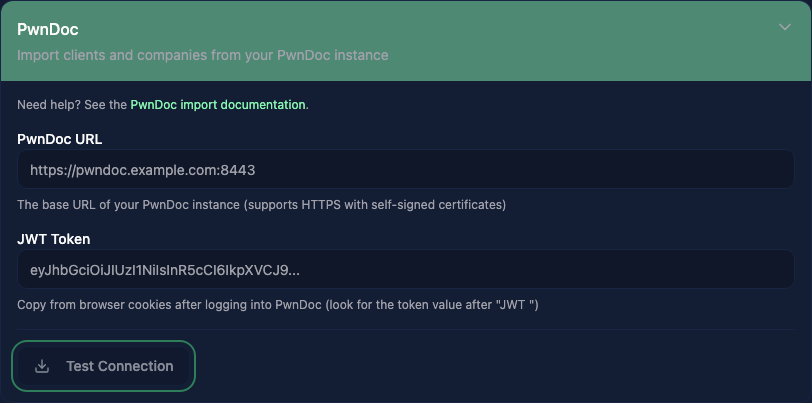
- Go to Administration > Settings > Integrations
- Expand the PwnDoc section
- Enter your PwnDoc URL (e.g.,
https://pwndoc.example.com:8443) - Paste your JWT token
- Click Test Connection. A green "Connected" badge appears on success
- Click Go to Import to open the import wizard
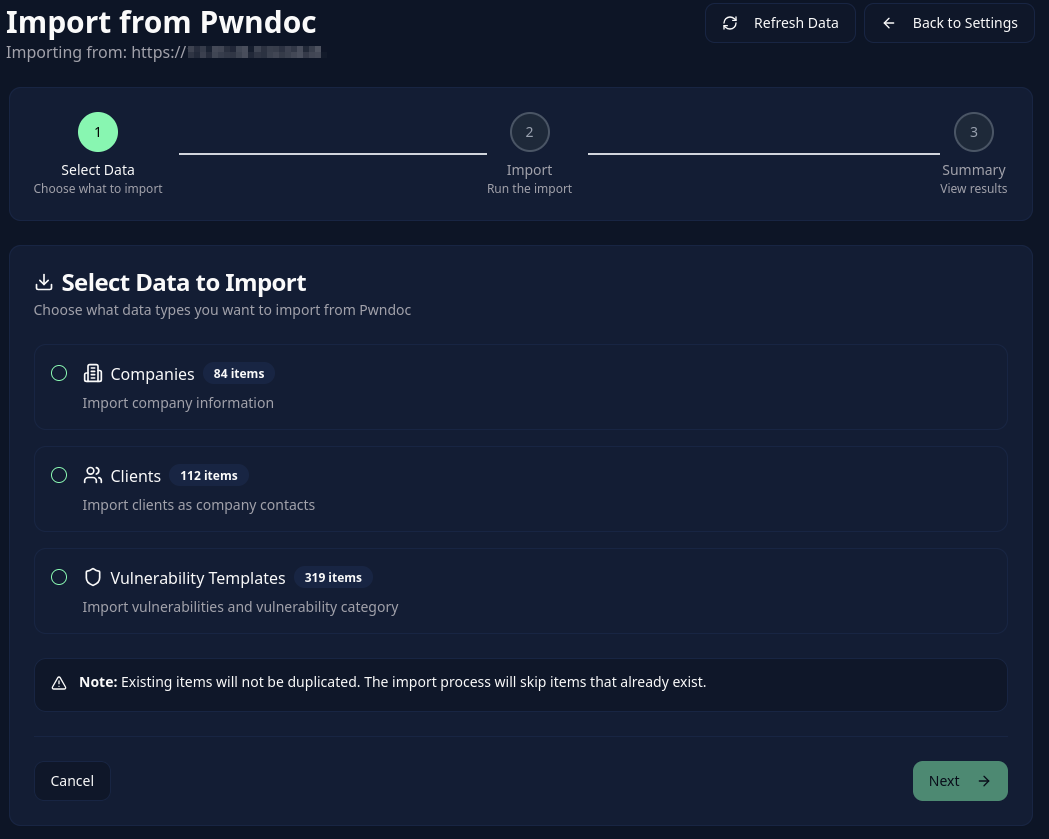
- Select what to import:
- Companies: PwnDoc companies become Vulnotes clients
- Clients: PwnDoc clients are imported as contacts within their company
- Vulnerabilities: A vulnerability template is created per category, and vulnerabilities are imported with their CVSS scores, custom fields, and images
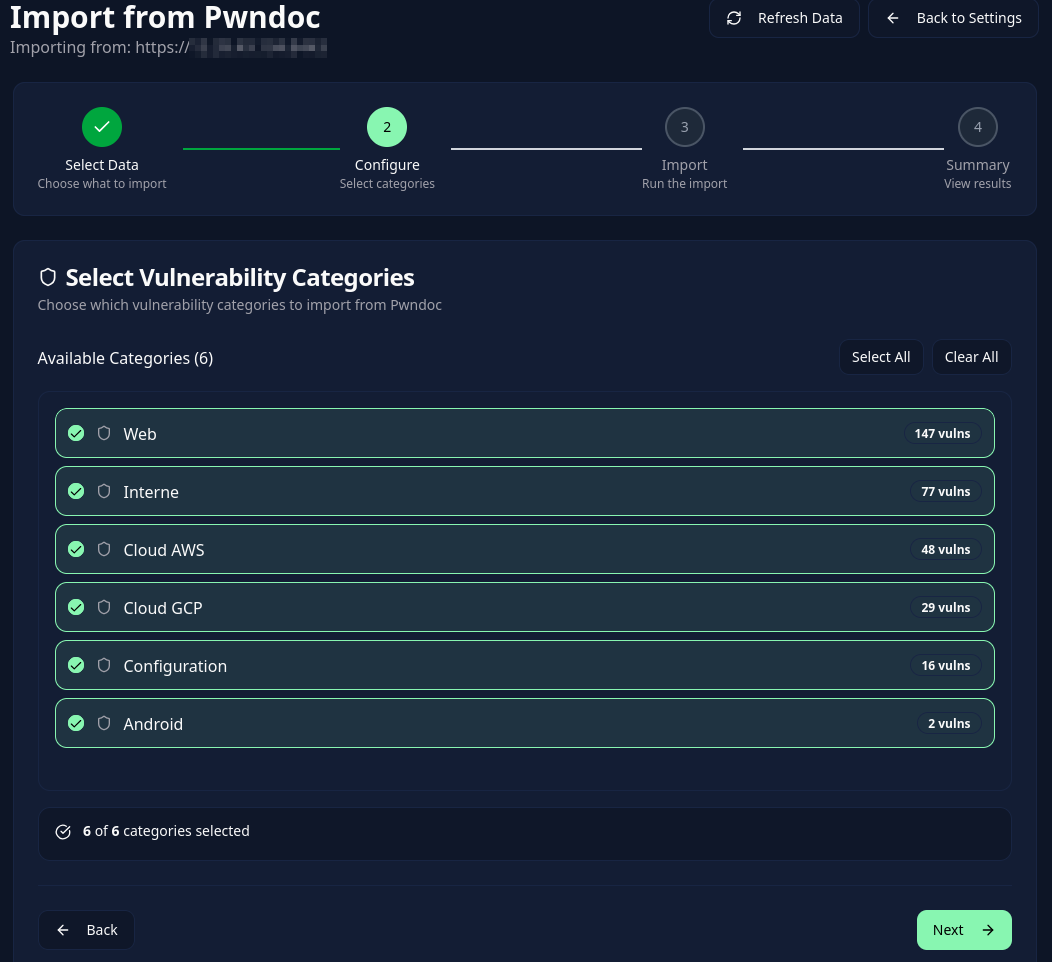
- If importing vulnerabilities, select which categories to include
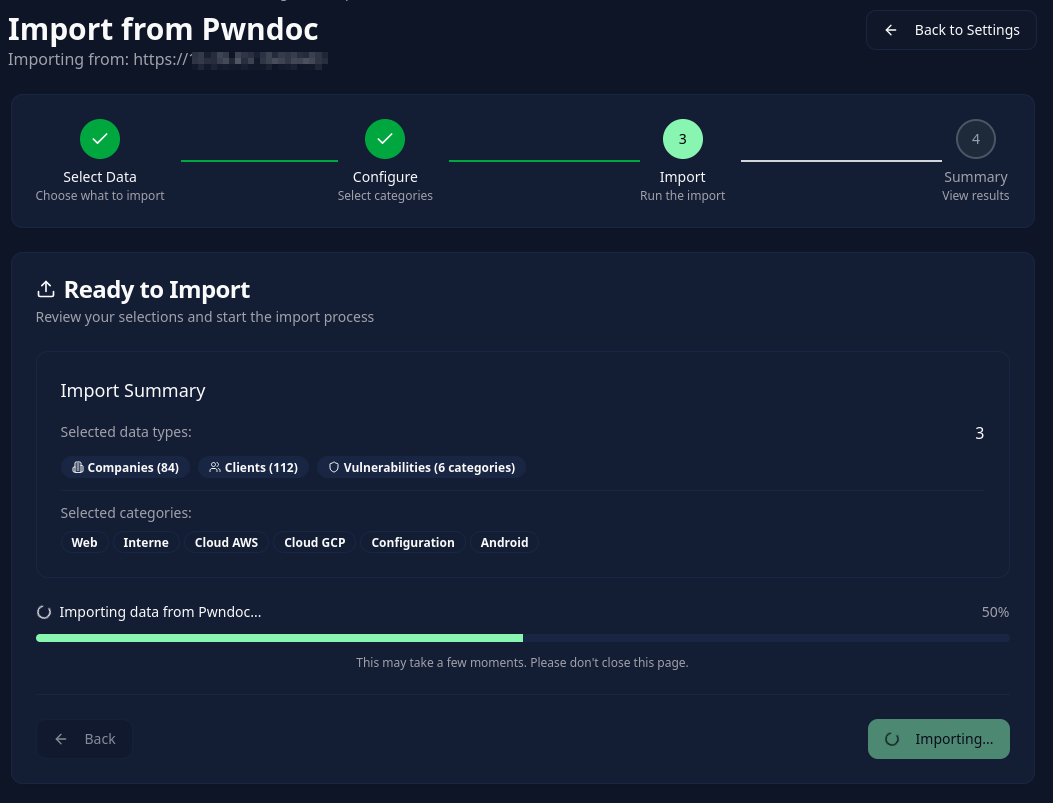
- Review the summary and click Import
What Gets Imported
| PwnDoc | Vulnotes | Notes |
|---|---|---|
| Companies | Clients | Logo included if available |
| Clients | Contacts under their company | Email, phone, role mapped |
| Vulnerability categories | Vulnerability Templates | One template per category with appropriate field types |
| Vulnerabilities | Standalone Vulnerabilities | CVSS scores, custom fields, images, multilingual data |
TIP
Duplicate detection is automatic. Existing companies and vulnerabilities detected as duplicates are skipped. Review the summary before retrying an import.
Vulnotes Archive Import
Import data from a previously exported Vulnotes .zip archive. This transfers clients, report templates, vulnerability templates, library vulnerabilities, and their exported images. It is not a full instance backup and does not restore user accounts or report history.
- Go to Administration > Settings > Integrations
- Expand the Vulnotes section
- Upload a
.zipfile previously exported from Vulnotes - Review the file contents (clients, templates, vulnerabilities, images)
- Click Start Import
Standardized Import (JSON)
The standardized import lets you import data from any tool: your own scripts, spreadsheets, or custom vulnerability management systems. Prepare a JSON file following the format below, and Vulnotes maps the data for you.
Quick Start
- Go to Administration > Settings > Integrations
- Expand the Standardized Import section
- Click Download Example to get a working template
- Edit the JSON file with your data
- Upload and import
JSON Format
Your file must have "format": "vulnotes-standardized" at the root. All sections (clients, vulnerabilityTemplates, vulnerabilities) are optional, include only what you need.
{
  "format": "vulnotes-standardized",
  "version": "1.0",
  "clients": [],
  "vulnerabilityTemplates": [],
  "vulnerabilities": []
}
Clients
Each client represents a company with optional contacts.
{
  "clients": [
    {
      "name": "Acme Corp",
      "contacts": [
        {
          "firstName": "Jane",
          "lastName": "Doe",
          "email": "jane@acme.com",
          "phone": "+1-555-0100",
          "role": "CISO"
        }
      ]
    }
  ]
}| Field | Type | Required | Description |
|---|---|---|---|
name | string | Yes | Company name |
contacts | array | No | Array of contact objects |
contacts[].firstName | string | No | Contact first name |
contacts[].lastName | string | No | Contact last name |
contacts[].email | string | No | Contact email address |
contacts[].phone | string | No | Contact phone number |
contacts[].role | string | No | Contact role/title |
Vulnerability Templates
Templates define the field schema for your vulnerabilities. If you reference a templateName in your vulnerabilities, make sure a matching template exists here or already in Vulnotes.
{
  "vulnerabilityTemplates": [
    {
      "name": "Web Application",
      "description": "Template for web application findings",
      "fields": [
        { "name": "Description", "type": "richtext", "required": true },
        { "name": "Remediation", "type": "richtext" },
        {
          "name": "Severity",
          "type": "dropdown",
          "options": ["Critical", "High", "Medium", "Low", "Info"]
        },
        { "name": "CVSS", "type": "cvss", "cvssVersion": "3.1" },
        { "name": "References", "type": "text" },
        { "name": "Affected Hosts", "type": "tags" },
        { "name": "Confirmed", "type": "checkbox" }
      ]
    }
  ]
}| Field | Type | Required | Description |
|---|---|---|---|
name | string | Yes | Template name |
description | string | No | Template description |
isMultilingual | boolean | No | Enable multilingual support |
supportedLanguages | string[] | No | Language codes (default: ["EN"]) |
fields | array | No | Field definitions (see below) |
Field Definition
| Field | Type | Required | Description |
|---|---|---|---|
name | string | Yes | Field label, also used to match vulnerability data |
type | string | No | One of the types below (default: text) |
required | boolean | No | Whether the field is required |
options | string[] | No | Options list (for dropdown type) |
cvssVersion | string | No | "3.1" or "4.0" (for cvss type) |
description | string | No | Help text shown to users |
placeholder | string | No | Placeholder text |
multilingual | boolean | No | Field supports translation |
order | number | No | Display order (auto-assigned if omitted) |
Supported Field Types
| Type | Value Format | Description |
|---|---|---|
text | string | Plain text input |
richtext | string (HTML) | Rich text with formatting (supports safe HTML) |
dropdown | string | Must match one of the options values |
tags | string[] | Array of tag strings |
cvss | object | CVSS scoring data (see below) |
number | number | Numeric value |
checkbox | boolean | True/false |
date | string | Date string (ISO 8601 recommended) |
customscore | object | Score value and selected criteria; define the scoring rules in the field's customScoreConfig |
Vulnerabilities
Each vulnerability references a template by name and provides field values keyed by field name.
{
  "vulnerabilities": [
    {
      "title": "SQL Injection in Login Form",
      "category": "Web",
      "tags": ["owasp-top-10", "injection"],
      "language": "EN",
      "templateName": "Web Application",
      "fields": {
        "Description": "<p>The login form is vulnerable to SQL injection via the <code>username</code> parameter.</p>",
        "Remediation": "<p>Use parameterized queries or prepared statements.</p>",
        "Severity": "High",
        "CVSS": {
          "score": 8.6,
          "vector": "CVSS:3.1/AV:N/AC:L/PR:N/UI:N/S:C/C:H/I:N/A:N"
        },
        "References": "https://owasp.org/www-community/attacks/SQL_Injection",
        "Affected Hosts": ["10.0.0.1", "10.0.0.2"],
        "Confirmed": true
      }
    }
  ]
}| Field | Type | Required | Description |
|---|---|---|---|
title | string | Yes | Vulnerability title |
category | string | No | Category label |
tags | string[] | No | Array of tags |
language | string | No | Language code (default: "EN") |
status | string | No | Open, In Progress, Resolved, or Closed (default: Open) |
templateName | string | No | Name of the vulnerability template to use |
fields | object | No | Field values keyed by field name |
Field name matching
Field values in fields are matched to template fields by name (case-insensitive). For example, if your template has a field named "Description", you can use "Description", "description", or "DESCRIPTION" as the key.
CVSS Field Format
For fields of type cvss, provide an object with:
{
  "score": 8.6,
  "vector": "CVSS:3.1/AV:N/AC:L/PR:N/UI:N/S:C/C:H/I:N/A:N"
}
Complete Example
Full example importing a client, a vulnerability template, and two vulnerabilities:
{
  "format": "vulnotes-standardized",
  "version": "1.0",
  "clients": [
    {
      "name": "Acme Corp",
      "contacts": [
        {
          "firstName": "Jane",
          "lastName": "Doe",
          "email": "jane@acme.com",
          "phone": "+1-555-0100",
          "role": "CISO"
        }
      ]
    }
  ],
  "vulnerabilityTemplates": [
    {
      "name": "Web Application",
      "description": "Template for web application findings",
      "fields": [
        { "name": "Description", "type": "richtext", "required": true },
        { "name": "Remediation", "type": "richtext" },
        {
          "name": "Severity",
          "type": "dropdown",
          "options": ["Critical", "High", "Medium", "Low", "Info"]
        },
        { "name": "CVSS", "type": "cvss", "cvssVersion": "3.1" },
        { "name": "References", "type": "text" }
      ]
    }
  ],
  "vulnerabilities": [
    {
      "title": "SQL Injection in Login Form",
      "category": "Web",
      "tags": ["owasp-top-10", "injection"],
      "language": "EN",
      "templateName": "Web Application",
      "fields": {
        "Description": "<p>The login form is vulnerable to SQL injection via the <code>username</code> parameter.</p>",
        "Remediation": "<p>Use parameterized queries or prepared statements.</p>",
        "Severity": "High",
        "CVSS": {
          "score": 8.6,
          "vector": "CVSS:3.1/AV:N/AC:L/PR:N/UI:N/S:C/C:H/I:N/A:N"
        },
        "References": "https://owasp.org/www-community/attacks/SQL_Injection"
      }
    },
    {
      "title": "Missing Security Headers",
      "category": "Web",
      "tags": ["headers", "hardening"],
      "language": "EN",
      "templateName": "Web Application",
      "fields": {
        "Description": "<p>The application is missing several recommended security headers including <code>X-Content-Type-Options</code>, <code>X-Frame-Options</code>, and <code>Content-Security-Policy</code>.</p>",
        "Remediation": "<p>Configure the web server to include the recommended security headers.</p>",
        "Severity": "Low",
        "CVSS": {
          "score": 3.7,
          "vector": "CVSS:3.1/AV:N/AC:H/PR:N/UI:N/S:U/C:N/I:L/A:N"
        },
        "References": "https://owasp.org/www-project-secure-headers/"
      }
    }
  ]
}
Behavior Notes
- Duplicates: Items with existing names get an "(Import)" suffix automatically
- Template resolution:
templateNamematches against both existing templates in Vulnotes and templates defined in the same import file - Missing templates: Vulnerabilities can be imported without a template, fields are stored by sanitized key name
- HTML sanitization: All richtext fields are sanitized server-side to remove dangerous content (scripts, event handlers, iframes, etc.). Plain text fields are stripped of all HTML
- Partial imports: If some items fail, the rest still import. Check the results for error details
- All sections optional: You can import just clients, just vulnerabilities, or any combination