

LDAP Integration
Vulnotes supports LDAP authentication, letting your users log in with their existing Active Directory or LDAP credentials instead of maintaining separate passwords.
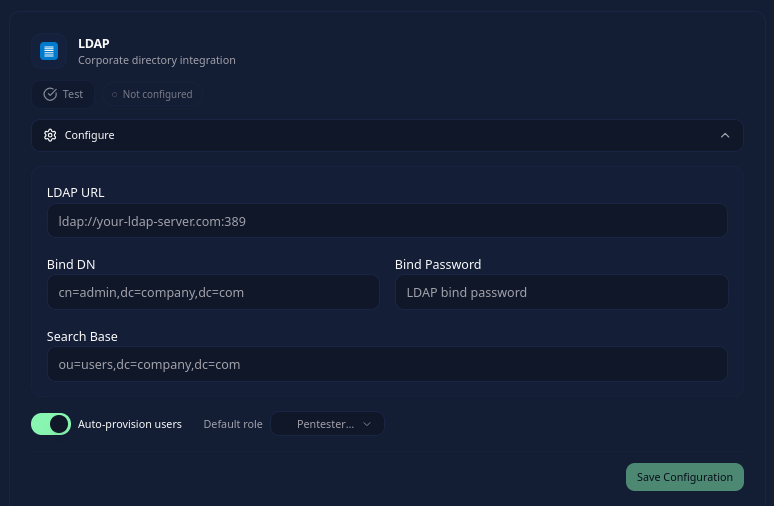
Configuration
Go to Administration > Settings > Security, enable Enable SSO, and open Configure on the LDAP card.
- LDAP URL - your LDAP server address (e.g.
ldap://dc.company.com:389orldaps://dc.company.com:636) - Bind DN - the distinguished name used to connect to the LDAP server
- Bind password - the password for the bind account
- Search base - where to search for users (e.g.
ou=Users,dc=company,dc=com)
Choose whether to Auto-provision users and select their Default role. Save the configuration, use Test, and enable the provider after the test succeeds.
How login works
Users select LDAP on the login page and enter their directory username or email and password. Vulnotes searches the uid, mail, and sAMAccountName attributes within the configured search base. The interface does not offer a custom search filter or attribute-mapping editor.
When auto-provisioning is enabled, a successful first login creates an account with the selected default role, subject to the license's user limit. With auto-provisioning disabled, the account must already be linked to the LDAP provider. Matching an existing local account's email does not link it automatically.
Administrators can then adjust the role and team assignment for LDAP users like any other user.
Testing the connection
The Vulnotes server must be able to reach the LDAP URL, including when it runs inside Docker. Test checks connectivity and the bind credentials; test a directory user's login too before inviting the rest of the team.
LDAP is available on server installations. SSO is hidden on the single-user Air-Gap Workstation.