

Local Authentication
Local authentication is the default method where users log in with an email and password stored in Vulnotes. No external identity provider is required.
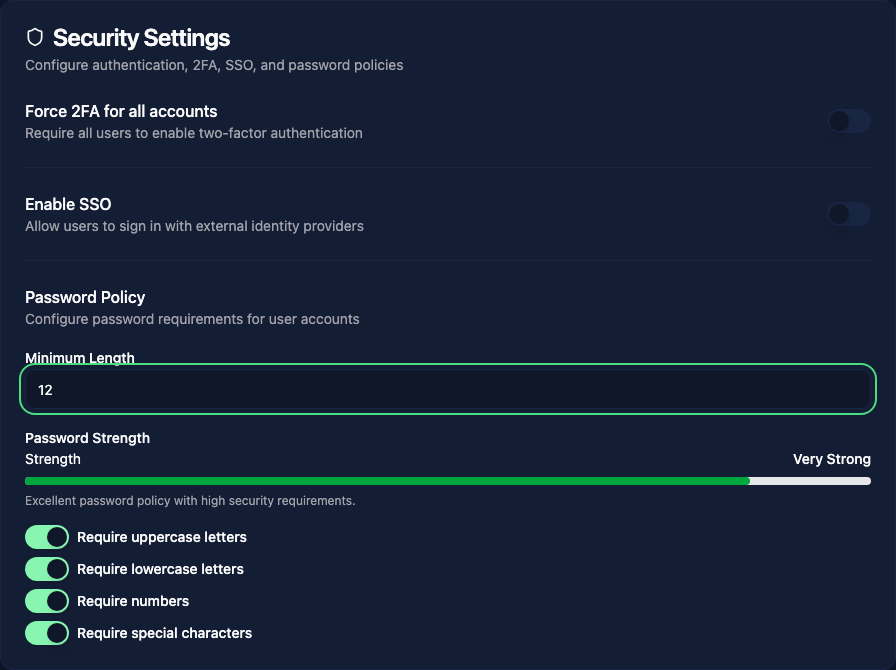
Password requirements
Administrators can configure password policies in Administration > Settings > Security. The available options include:
- Minimum password length
- Require uppercase and lowercase letters
- Require numbers
- Require special characters
The server enforces a minimum length of 12 characters, even if the settings control offers a lower value. Initial setup and invitation enrollment require uppercase and lowercase letters, a number, and a special character as well.
These rules apply when users set a password; changing the policy does not inspect or automatically replace existing passwords. The interface does not offer a password-expiration setting.
Changing or recovering a password
Use Profile > Security > Change Password while signed in. If you cannot sign in, use Forgot your password? on the login page. Password recovery requires working email delivery; see Password recovery for offline installations.