

Page Layout
Templates are made of pages. Each page has its own HTML content and layout settings that control how it renders in the PDF.
Page settings
Open Pages in the sidebar and select a page to rename it or change its layout:
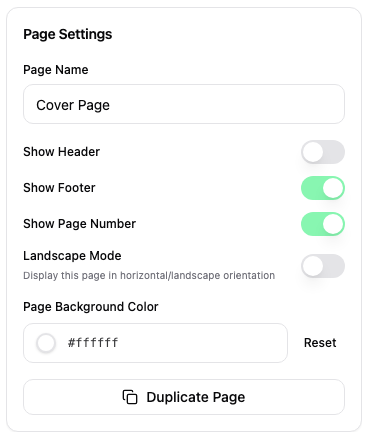
| Setting | Options | Description |
|---|---|---|
| Orientation | Portrait, Landscape | Page orientation |
| Show header | On / Off | Display the header on this page |
| Show footer | On / Off | Display the footer on this page |
| Show page number | On / Off | Display page number in the footer |
| Page background color | Color, Reset | Override the theme background, or reset to the theme color |
Drag pages in the list to reorder them. Use Duplicate Page to copy the selected page and its design. The trash icon removes a page after confirmation.
Headers & footers
Headers and footers are defined at the template level and shared across pages that have them enabled. Portrait and landscape pages can have separate header and footer designs. They support the same LiquidJS syntax as page content.
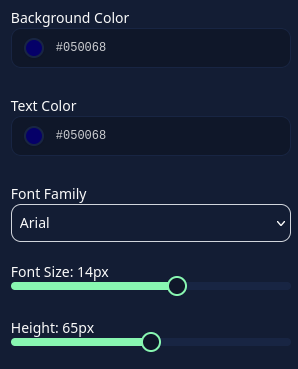
Header example:

Footer example:

Multi-page structure
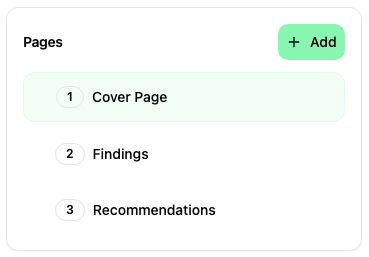
A typical report template uses multiple pages:
- Cover page: Title, client info, dates.
- Table of contents: Auto-generated ToC.
- Executive summary: Custom variables for summary text.
- Scope & methodology: Scope entries, methodology description.
- Findings overview: Stats table, severity chart.
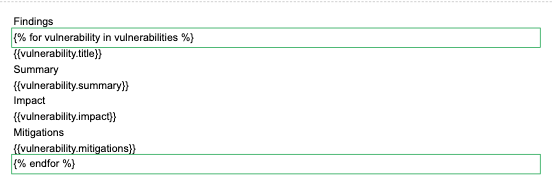
- Vulnerability details: Use a
{% for vuln in vulnerabilities %}loop with{% pagebreak %}between findings.
Columns and page breaks
Use Layout in the toolbar for side-by-side content, such as a chart next to a statistics table. Click inside a column to add content. Select the layout to choose two, three, or four columns and adjust its minimum height.
Use the toolbar's Page Break to start the following content on a new page in the report preview and export. For repeated findings, use the LiquidJS page break inside the loop.