

Syntax
Vulnotes templates use the LiquidJS template engine. This page covers the syntax basics you need to write templates.
Live debugger
A live LiquidJS debugger is available in the report preview. It lets you test your template expressions directly against the actual report context (variables, filters, loops) and see the rendered output in real-time.
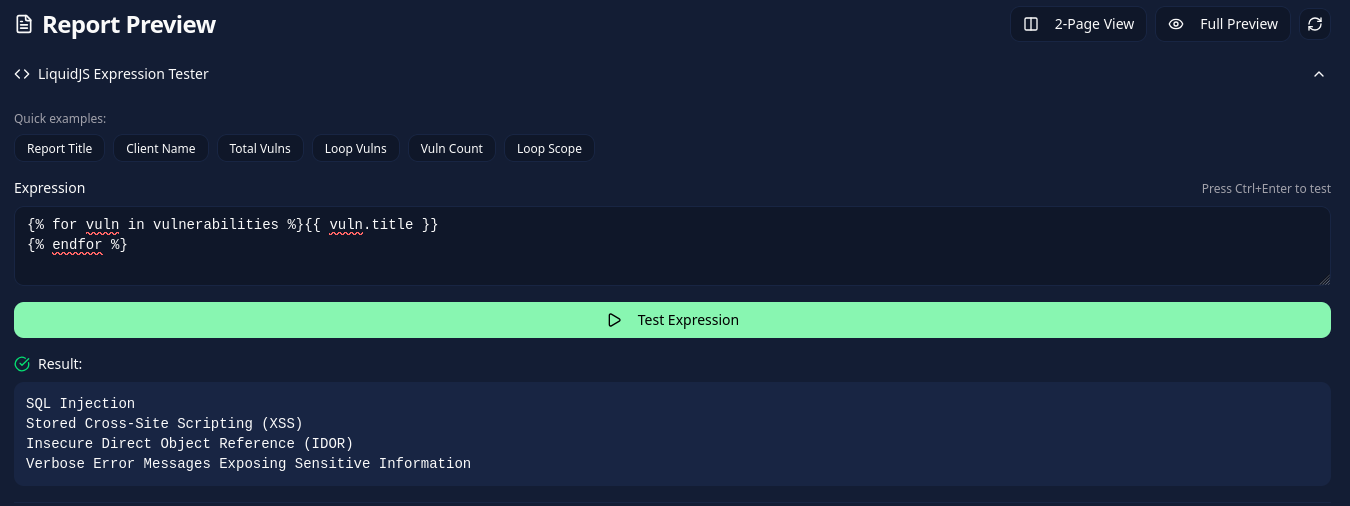
Output
Use double curly braces to output a variable:
{{ report.title }}
{{ client.name }}
{{ stats.totalVulnerabilities }}
You can chain filters with the pipe | character:
{{ report.title | uppercase }}
{{ vuln.cvss.score | score }}
Conditionals
if / elsif / else
{% if stats.criticalCount > 0 %}
    {{ stats.criticalCount }} critical vulnerabilities found.
{% elsif stats.highCount > 0 %}
    {{ stats.highCount }} high vulnerabilities found.
{% else %}
    No critical or high vulnerabilities found.
{% endif %}
Comparison operators
| Operator | Description |
|---|---|
== | Equal |
!= | Not equal |
> | Greater than |
< | Less than |
>= | Greater or equal |
<= | Less or equal |
Logical operators
{% if stats.criticalCount > 0 and stats.highCount > 0 %}
  Both critical and high vulnerabilities were identified.
{% endif %}

{% if stats.criticalCount == 0 or stats.highCount == 0 %}
  No critical or no high vulnerabilities.
{% endif %}
Truthy / falsy checks
Only nil and false are false in Liquid. To skip empty text, compare it with blank:
{% if scope.description != blank %}
  {{ scope.description }}
{% endif %}
unless
unless is the opposite of if:
{% unless stats.totalVulnerabilities == 0 %}
  Vulnerabilities were identified during the assessment.
{% endunless %}
case / when
Inside a loop, use the loop variable:
{% case vuln.severity %}
  {% when 'Critical' %}
    Immediate action required
  {% when 'High' %}
    Action required
  {% when 'Medium' %}
    Should be addressed
  {% when 'Low' %}
    Consider fixing
  {% else %}
    Informational
{% endcase %}
Loops
for
Loop through arrays like vulnerabilities, scope entries, or contacts:
{% for vuln in vulnerabilities %}
  {{ vuln.title }}
  Severity: {{ vuln.severity }}
{% endfor %}
Loop variables
Inside a for loop, you have access to:
| Variable | Description |
|---|---|
forloop.index | Current iteration (1-based) |
forloop.index0 | Current iteration (0-based) |
forloop.first | true on first iteration |
forloop.last | true on last iteration |
forloop.length | Total number of items |
{% for vuln in vulnerabilities %}
  {{ forloop.index }}. {{ vuln.title }}
{% endfor %}
Sorting before looping
Vulnotes supports filters in the loop expression:
{% for vuln in vulnerabilities | sort_by: 'cvss.score' %}
  {{ vuln.title }}: {{ vuln.cvss.score | score }}
{% endfor %}
limit
Restrict the loop to a maximum number of iterations:
{% for vuln in vulnerabilities limit: 3 %}
  {{ vuln.title }}
{% endfor %}
offset
Skip a number of items before starting the loop:
{% for vuln in vulnerabilities offset: 1 %}
  {{ vuln.title }}
{% endfor %}
Assign
Create local variables within a template:
{% assign total = stats.criticalCount | plus: stats.highCount %}
{{ total }} vulnerabilities rated Critical or High.{% assign has_critical = false %}
{% if stats.criticalCount > 0 %}
{% assign has_critical = true %}
{% endif %}Page breaks
Insert a page break in the rendered report:
{% pagebreak %}Inside a finding loop, avoid adding a break after the last finding:
{% unless forloop.last %}{% pagebreak %}{% endunless %}