

Content Improvement
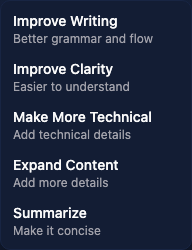
The Improve feature lets you refine existing report text using AI.
How to use it
In a report section or finding field where AI controls are available, click Improve. Choose the change you want:
- Improve Writing - improve grammar and flow
- Improve Clarity - make the text easier to understand
- Make More Technical - add technical detail
- Expand Content - develop the existing text
- Summarize - make it more concise
The result replaces the text in the editor. Review it, correct any unsupported details, and save when ready. Keep a copy of wording you want to preserve before starting.
When to use it
This feature is particularly useful for:
- Polishing a first draft after you have written the technical details quickly
- Making findings more consistent in tone across a report written by multiple people
- Expanding bullet points into full paragraphs for the executive summary
- Shortening overly verbose technical descriptions