

Vulnerability Generation
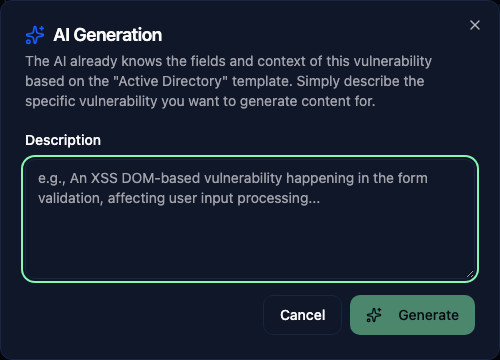
AI can generate complete vulnerability entries from minimal input. This is one of the most time-saving features when building your vulnerability library or writing findings.
Generating from the library
Click New Vulnerability, select a template, then click Generate with AI. In AI Generation, describe the vulnerability in Description and click Generate. Depending on the template, the draft can include:
- A detailed technical description
- Impact assessment
- Step-by-step remediation guidance
- Relevant references
The generated content follows the fields configured in your vulnerability template. Description, impact, remediation, and references are only included when the template provides those fields. Template authors can also set writing instructions and example output under AI Generation.
Generating findings in reports
When editing a finding in a report, use Generate beside a supported field to draft its content from the finding and report context. AI controls depend on the features enabled by your administrator.
To draft a whole finding from a description or screenshots, see Vision.
This works well for writing the first draft of a finding. Generate the content, then review and adjust it to match the specifics of what you actually found during the assessment.
Tips for better results
- Use descriptive titles. "SQL Injection" will give you generic output. "Blind SQL Injection in search parameter allowing data exfiltration" gives much more targeted content.
- Generate one field at a time and review before moving to the next. The AI uses the existing content as context, so a good description helps it generate a better remediation section.
- Always review and edit AI-generated content. It provides a solid starting point but should be tailored to the actual findings of your assessment.