

API Keys
API keys give programmatic access to Vulnotes: scripts, CI pipelines, and the MCP server. Each key carries an explicit list of permissions that you choose when you create it.
Creating a key
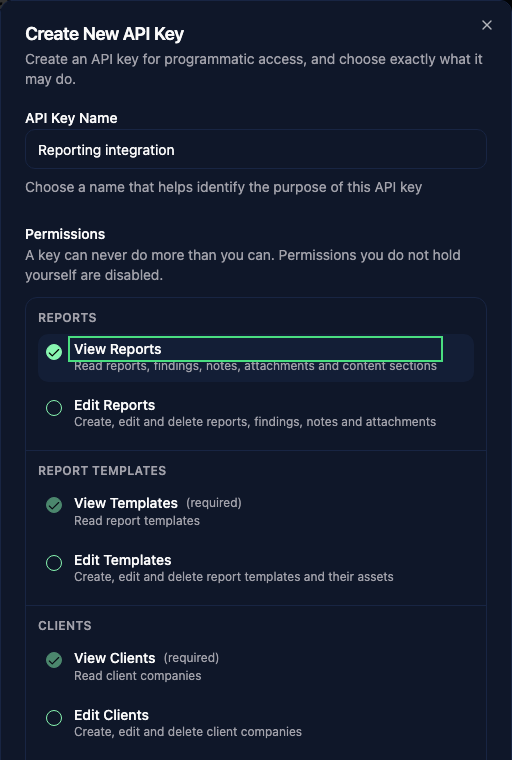
Go to Administration > Settings > API & MCP and click Create API Key.
- Give the key a name that says what it is for, e.g.
CI/CD PipelineorClaude MCP. - Tick the permissions it needs. Permissions you do not hold yourself are shown greyed out with a lock; you cannot grant them.
- Copy the key. It is shown once and never again. If you lose it, regenerate the key rather than creating a new one.
Creating a key requires the rw:settings permission.
Permissions
A key never gets blanket access. It does exactly what you ticked, and nothing else.
| Permission | Grants |
|---|---|
ro:reports / rw:reports | Reports, findings, notes, images, attachments, content sections |
ro:templates / rw:templates | Report templates, revisions, structured authoring, and template assets |
ro:clients / rw:clients | Client companies |
ro:vulnerabilities / rw:vulnerabilities | The vulnerability library |
ro:vulnerability_templates / rw:vulnerability_templates | Vulnerability templates and their field definitions |
ro:planning / rw:planning | The planning calendar, events and availability |
manage:planning | Deleting planning events and assigning any user |
A rw: permission always grants the matching ro:. Selecting a permission also grants what it depends on, and the dialog ticks those boxes for you so you can see what the key will really be able to do:
ro:reportsandrw:reportsimplyro:templates,ro:clients,ro:vulnerabilitiesandro:vulnerability_templatesmanage:planningimpliesrw:planning, which impliesro:planning
Note that manage:planning is a separate grant from rw:planning: a key that can create and reschedule events cannot necessarily delete them.
Two rules that always hold
A key can only hold machine-usable permissions. Account management (users, roles, teams, settings, licensing, and system administration) is never delegable to a key. In particular, an API key can never create, read or rescope another API key, so a leaked key cannot be used to mint a more powerful one.
A key can never exceed its owner. You cannot grant a permission you do not have. And the check is not made only when the key is created: if the owner later loses a permission, every key they own loses it too, on the very next request. Deactivating or deleting a user immediately disables all of their keys.
TIP
Because a key acts as its owner, it also inherits their team restrictions: the clients their team can access, and, if their team uses contributors-only report visibility, only the reports they personally work on.
What a key cannot reach
Regardless of its permissions, an API key is refused by:
/api/api-keys: key management, except/api/api-keys/me(see below)/api/users/team-members: the organisation-wide staff directory/api/ai/stats: tenant AI credit usage- Notifications, themes and fonts
To resolve people for planning assignments, use GET /api/planning/users, which is permission-scoped and honours calendar visibility.
The AI generation endpoints require the permission for the resource they write: rw:reports for report content and findings, rw:vulnerabilities for vulnerability generation and translation. A key without them cannot spend your AI credits.
Checking what a key can do
GET /api/api-keys/me returns the permissions the calling key actually carries, after intersecting the scopes stored on the key with its owner's current permissions:
curl -H "X-API-Key: vuln_sk_..." https://your-instance/api/api-keys/me{
"id": "665f...",
"name": "Claude MCP",
"keyPrefix": "vuln_sk_abc123...",
"permissions": ["ro:planning", "rw:planning"]
}This is the authoritative answer. The MCP server calls it on startup so it only advertises the tools your key can actually use.
Managing existing keys
- Disable a key with the toggle to revoke access without deleting it. Re-enabling restores the same key.
- Regenerate issues a new secret for the same key, keeping its name and permissions. The old secret stops working immediately.
- Delete removes the key permanently.
Use Edit permissions to change a key's scopes. Confirm your identity when prompted, review the selected permissions, and save. Changes take effect on the next request; reconnect an MCP client to refresh its advertised tool list.
Upgrading from unscoped keys
Keys created before permissions were configurable keep their previous report, client, vulnerability, vulnerability-template, and template-read access until you rescope them. Planning and template-write permissions must be added explicitly.